An aftermovie for your website, YouTube, LinkedIn and projection at the next event is shot horizontally (16:9), and short clips for Instagram Reels and TikTok vertically (9:16). If you need both formats, the safest option is to shoot horizontally and wider, with vertical frame guides on the camera screen, and then edit a vertical version from the same footage. Vertical only is shot when it's certain that a horizontal video won't be needed.
Organisers rarely think about this in advance - most often we're the ones who raise it when planning the shoot. A short explanation usually follows of what each format means and where it's used, and it's not unusual for an organiser to change their mind after the first decision and switch format before the event. The decision affects how the whole day is filmed, so we explain it all in one place here - and that's why we most often suggest a solution that keeps both formats open.
What do horizontal and vertical mean?
Horizontal means lying flat: the frame is wider than it is tall, like a TV screen or a phone turned on its side. Vertical means upright: the frame is taller than it is wide, like a phone held in your hand. The same things are also called landscape and portrait.
16:9
9:16
Aspect ratios - what 16:9, 9:16 and 4:5 mean
The aspect ratio tells you how wide the frame is in relation to its height. The first number is the width, the second the height: 16:9 is a horizontal frame, and 9:16 is the same frame turned vertically.
| Ratio | Shape | Where it's used |
|---|---|---|
| 16:9 | Horizontal | Aftermovies, recordings of talks, websites, YouTube, projection on a screen or LED wall |
| 3:2 | Horizontal | The standard photo straight from the camera - reports, media, websites |
| 1:1 | Square | Adverts and posts on social media |
| 4:5 i 3:4 | Vertical | Photos in Instagram posts, LinkedIn posts viewed on mobile |
| 9:16 | Vertical | Instagram Reels and Stories, TikTok, YouTube Shorts, Facebook Reels |
Recommended formats: LinkedIn, Instagram and TikTok
| Platform | Recommended format | What to watch for |
|---|---|---|
| Video: 16:9 for aftermovies and talks, 9:16 (up to 1080 x 1920 px) for short clips. Photos: horizontal or 4:5 | LinkedIn is mostly viewed on mobile, where vertical and 4:5 content takes up more space in the feed. For longer video and recordings of talks, horizontal is still the standard. | |
| Reels and Stories 9:16 (1080 x 1920 px), photos 4:5 (1080 x 1350 px) or 3:4 (1080 x 1440 px) | On the profile grid, posts are shown as vertical 3:4 rectangles, so the important part of the frame and of the Reels cover should be in the centre. | |
| TikTok | Vertical video 9:16, 1080 x 1920 px | Don't place text, logos and faces along the bottom and right edges, because the caption and the app's buttons cover them. |
| Website and YouTube | Horizontal video 16:9 | Aftermovies and recordings of talks. Short vertical clips go out as YouTube Shorts. |
| Projection at the event | Horizontal video 16:9 | Screens and LED walls are horizontal - vertical video on them is left as a narrow strip. |
| Report, media, sponsors | Horizontal photos 3:2 | The standard format for reports, press releases and presentations. |
Website: mobile or desktop?
On most websites today more than half of visits come from mobile, so the logical conclusion would be - everything vertical. But the more important question is how much those visitors matter to your business. For business events they are sponsors, partners and future attendees, and they often open the website on a computer in the office too. In your website statistics, look at which devices the enquiries and registrations come from, not just the visits.
The most common solution is a combination: a horizontal aftermovie for desktop, and a vertical version for mobile. A website can automatically show the right version depending on the device.
Once horizontal, now both
For a long time professional filming favoured the horizontal format. Cameras, tripods and gimbals are built for a wide frame, and vertical video was a sign of filming on a phone. Today, with extra kit - an L-bracket, a camera cage or a gimbal with a vertical mode - a professional camera shoots vertically without any trouble, at full quality. At larger events, when a team is filming, one videographer can shoot dedicated vertical footage and another horizontal. The same differences apply to aerial footage, and some drones have a true vertical mode as well - more in the guide vertical or horizontal drone video.
You can crop vertical out of horizontal - but not the other way round
A vertical 9:16 video can be cropped out of a horizontal 16:9 one. It's hard to get a good horizontal video out of a vertical one, because the left and right sides of the frame were never filmed. A video like that is left as a narrow strip with black or blurred edges on a big screen or a computer.
When a horizontal frame is cut down to a vertical one, only a narrow part of the frame is left - roughly a third of the width, usually the centre. About two thirds of the frame is lost. This is how it looks on a real photo:
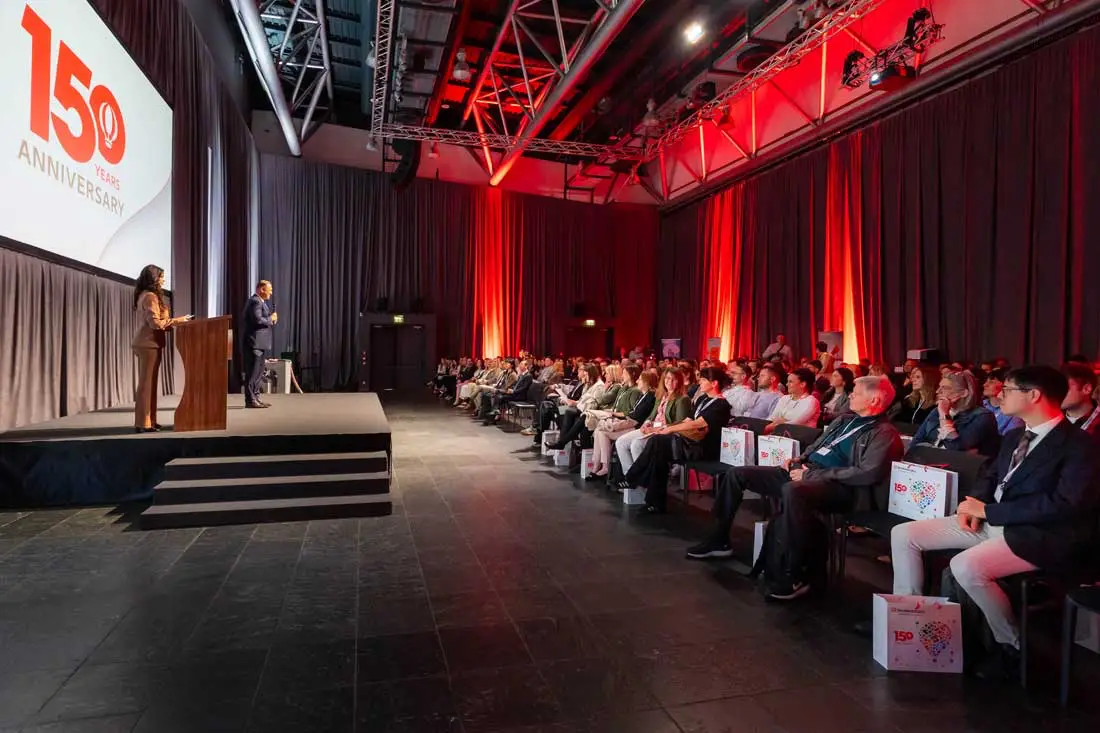 16:9 original16:9 - shifted crop
The crop can be shifted left or right, but only a third of the frame ever fits in the vertical version: either the speaker or the audience, rarely both. A panel of four doesn't fit in a vertical frame; it's put together from individual shots instead.
The safe solution: shoot wider, with vertical frame guides
When you need both formats, the safest option is to shoot horizontally but frame every shot wider than usual, so there's enough room to crop. Extra vertical frame guides are switched on on the camera screen, so throughout the shoot we can see what will make it into the vertical version. We also use an 80% safe-area frame: the speaker and the important details stay inside the frame, and the edge of the shot acts as a margin. That's why we shoot slightly wider than the final video will be.
- The speaker, their face and their gestures are kept inside the guides, and the slide and the audience stay in the wider part of the frame.
- Interviews with speakers and organisers are filmed so they work in both formats.
- The horizontal aftermovie stays at full quality, and the vertical clips are edited from the same footage, shorter and at a faster pace.
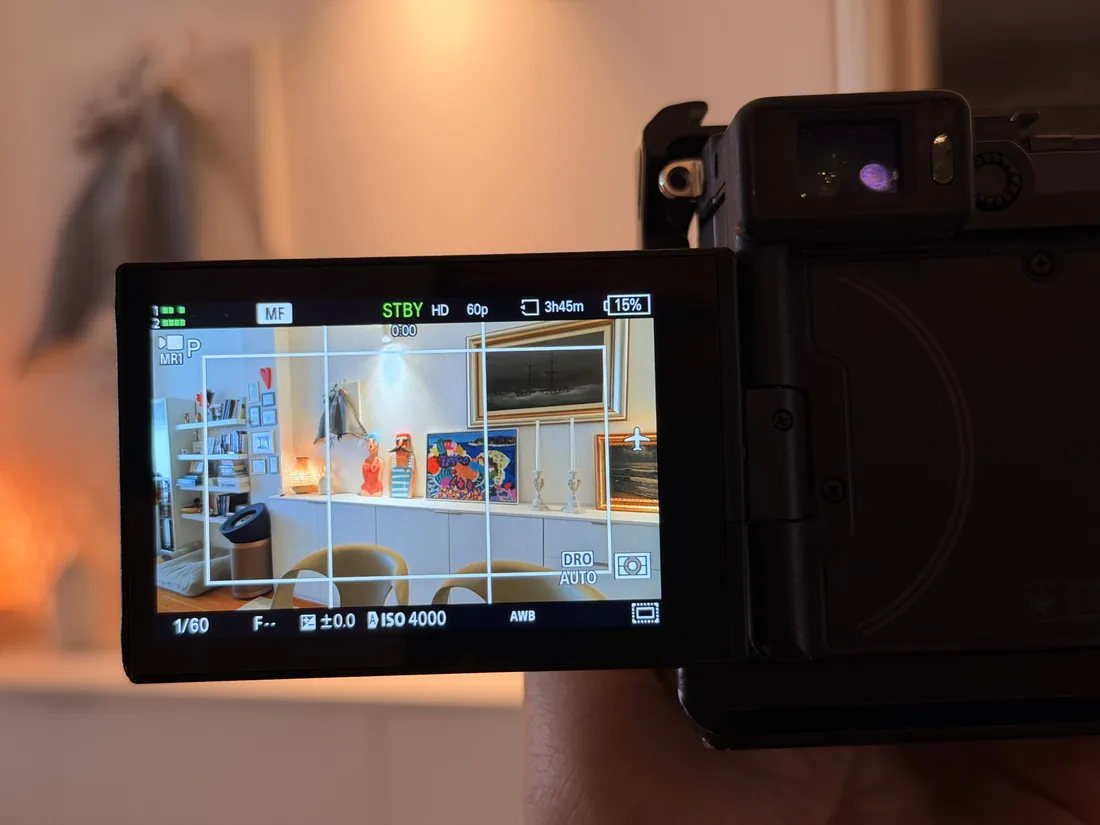
We take the same approach every time we film an event, from a company party to a congress in several halls.
Shooting vertical only makes sense when you're completely sure a horizontal video won't be needed - for example a short Reel from a party or a teaser for social media. In that case the vertical frame gives full quality and the best composition for mobile.
Event photos: horizontal, plus a few vertical
Event photos are mostly shot horizontally - for the report, the media, your website, LinkedIn and the presentation for sponsors. Vertical photos are needed for Instagram posts and Stories, but also for printed materials: posters, roll-up banners and the announcement of the next event are usually vertical. So it's worth agreeing a few dedicated vertical shots in advance, rather than cropping them out of horizontal ones later:
- The speaker at full height on stage.
- Branding - roll-up banners, sponsor walls, stands.
- Details - name badges, materials, catering, the styling of the venue.
- Atmosphere - a full hall or networking, as a shot for a poster or an announcement.
What to agree before the event
Tick off what you've already decided. You can print the checklist too.
Planning an event and not sure which format you need?
Send the date, location and where you'll use the video and photos, and we'll agree the formats before the event. That way you get material for your website, LinkedIn and social media from a single shoot.
Send an enquiry by email See the pricesFrequently asked questions
Is an aftermovie shot horizontally or vertically?
Horizontally, in 16:9, because it's shown on websites, YouTube, LinkedIn and on a screen or LED wall. The vertical version for Reels and TikTok is edited from the same footage.
Can I get video for Reels and for YouTube from the same shoot?
Yes, if it's shot horizontally and wider than usual, with vertical frame guides on the camera screen. That way the important parts of the frame fit in the vertical version too.
Why not shoot everything vertically?
Because it's hard to get a horizontal video out of a vertical one. A vertical frame is missing the left and right sides, and websites, YouTube, presentations and projection at the next event all need horizontal video.
What is the aspect ratio for Instagram Reels and TikTok?
9:16, vertical across the whole phone screen. Photos in Instagram posts use a 4:5 or 3:4 ratio.

Event photographer and videographer, owner of Luminus Visual Studio. He has worked in photography and video for 15 years, photographs and films corporate events, conferences and congresses, and for years also covered large events and weddings as part of a team. Licensed drone pilot. Instagram: @dp.visual